





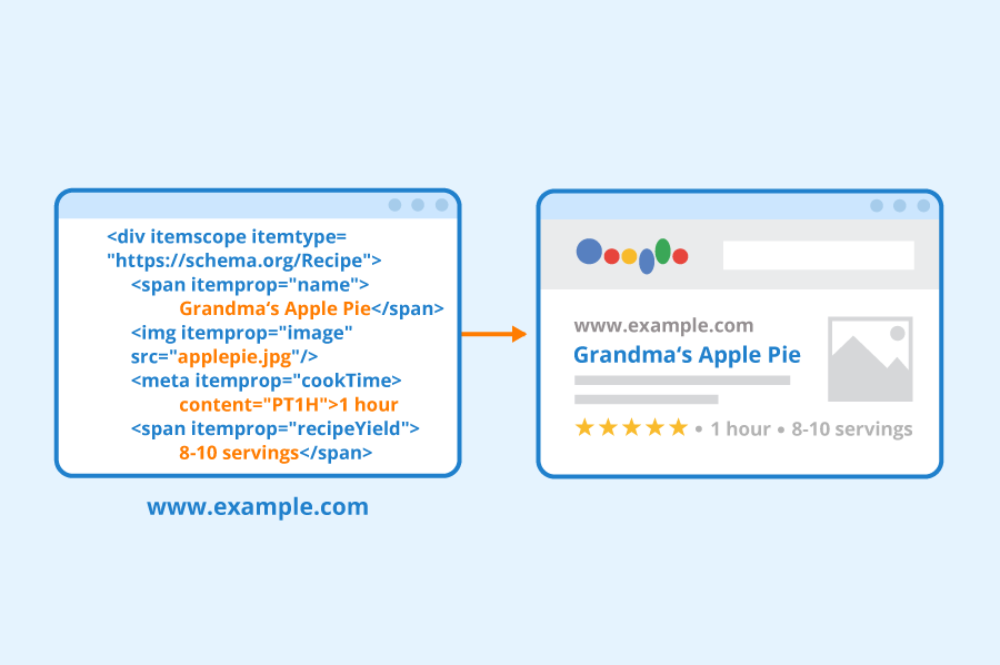
Product schema markup is structured data, usually written in JSON-LD, that tells search engines the facts about a product: its name, image, price, currency, stock status, reviews, shipping and returns. It does not lift your rankings on its own, but it makes your product pages eligible for richer Google results, such as price, availability and star ratings, and it gives Google and other systems an accurate, machine-readable version of your product data.
If you sell online, it belongs on every product page. Most eCommerce platforms add a basic version automatically, so for most businesses the real job is checking what is already there, filling the gaps and keeping it accurate.
What is product schema markup?
Schema markup is a shared vocabulary, published at Schema.org and backed by the major search engines, for describing things on a web page in a way software can read. The Product type describes an item for sale, and the Offer type inside it describes the price, currency and availability.
There are three ways to add it to a page: JSON-LD, Microdata and RDFa. Google supports all three, but says that in general it recommends JSON-LD if your site’s setup allows it, because it sits in one block of code rather than being woven through your HTML. Google’s product structured data documentation covers all required and recommended fields.
What product schema can and cannot do
Richer search results
With valid product markup, Google can show extra details under your listing, such as the price, whether the item is in stock, a star rating, shipping costs and your returns policy. These details help a searcher decide before they click, which tends to bring better-qualified visits. Google never guarantees a rich result, though: valid markup makes a page eligible, and Google decides whether to show it.
Cleaner product data for Google
Markup removes guesswork. Instead of inferring your price from the page layout, Google reads it directly, along with identifiers such as a GTIN or brand that help it match your product to the same item sold elsewhere.
Clearer facts for voice assistants and AI search
Google says there is no special structured data you need to add to appear in AI Overviews or AI Mode, and no extra optimisation beyond normal SEO good practice. What it does recommend is making sure your structured data matches the visible text on the page. Accurate, consistent product facts make it easier for any system, from Google to an AI assistant answering a spoken question, to describe your product correctly. Our post on why voice search matters for SEO covers the voice side in more detail.

What it will not do
Structured data is not a shortcut to higher rankings. Google describes it as a way to help it understand a page and to enable rich results, not as a ranking boost. A product page still needs useful content, good photos, fair prices, fast loading and a site Google trusts.
Product snippets and merchant listings
Google treats product markup in two ways, depending on whether people can buy from the page.
| Type | Use it for | Required properties |
|---|---|---|
| Product snippets | Pages about a product where people cannot buy it directly, such as reviews, comparisons and buying guides | name, plus at least one of review, aggregateRating or offers |
| Merchant listings | Pages where customers can buy the product from you | name, image and offers (a single Offer with a price above zero and a priceCurrency) |
The two overlap. A product page that meets the merchant listing requirements can also be eligible for product snippets, so an online shop should aim for the merchant listing standard.
Which properties to include
Beyond the required fields, these are the properties that make the biggest practical difference for a UK online shop.
| Property | What it holds | Notes |
|---|---|---|
| name, image, description | The product title, main photos and a short description | Must match what the page shows |
| brand, gtin, sku | The brand name, the barcode number (GTIN) and your own stock code | Use the most specific GTIN you have, as a number, not a URL |
| offers: price, priceCurrency | The selling price and its currency | Use a plain number for the price and GBP for pounds sterling |
| offers: availability | In stock, out of stock, pre-order and so on | Keep it in step with your real stock levels |
| aggregateRating, review | Your average rating and individual reviews | Only for genuine reviews that are visible on the page |
| shippingDetails | Delivery cost, destination and delivery time | Can be set once for the whole shop instead (see below) |
| hasMerchantReturnPolicy | Your returns window and conditions | Can also be set once for the whole shop |
Google recommends setting a standard shipping and returns policy once, under your Organization markup, and only adding them to individual products when a product is an exception. You can also enter shipping and returns in Google Merchant Center or Search Console. If your products come in sizes or colours, Google supports product variant markup, which groups the variations under one parent product.
How to add product schema to your website
Check what your platform already outputs
Start by looking at what is already on your product pages. WooCommerce adds basic Product markup to single product pages out of the box, most Shopify themes include it, and SEO plugins such as Yoast can add their own. Run a product page through the Rich Results Test (see below) and note what is there and what is missing. Watch for two separate Product blocks from a theme and a plugin, which can contradict each other.
Fill the gaps
Default output is often thin. Brand, GTIN, shipping and returns are the usual gaps. Depending on your platform, you can fill them through product fields, an SEO or schema plugin, or a small piece of custom code that adds to the platform’s own markup. Google advises including product markup in the HTML the server sends, rather than injecting it later with JavaScript, because JavaScript-generated markup can make shopping crawls less frequent and less reliable.
Hand-coded markup for custom sites
On a custom-built site, a developer adds a JSON-LD script to each product template, filling the values from the product database so the markup always matches the page. Building it into the template, rather than pasting it page by page, means prices and stock levels cannot drift out of date. If you are planning a new shop, it is worth making structured data part of the brief for your eCommerce web design project.
Follow the rules
- Mark up only what the visitor can see on the page.
- Keep prices, currency and availability identical to the visible page.
- Only include ratings and reviews from real customers, shown on the page.
- Use Product markup for products. Services are better described in your page content and other schema types.
How to test and monitor your markup
Rich Results Test
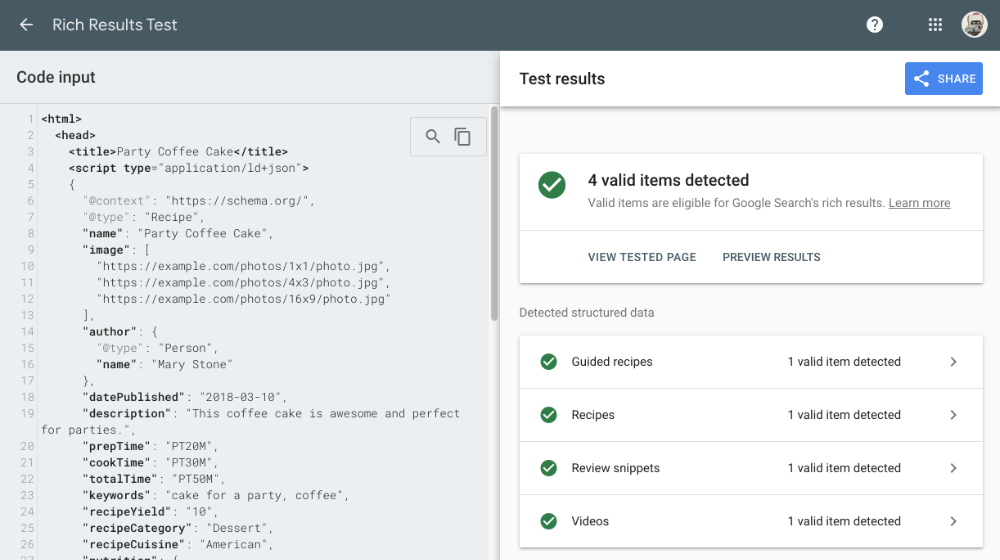
Google’s Rich Results Test is the official tool for checking whether a page is eligible for Google’s rich results. Enter a URL or paste code, and it lists the structured data it found, with errors that block eligibility and warnings for missing recommended fields. It replaced the old Structured Data Testing Tool, which Google retired in 2021.
Schema Markup Validator
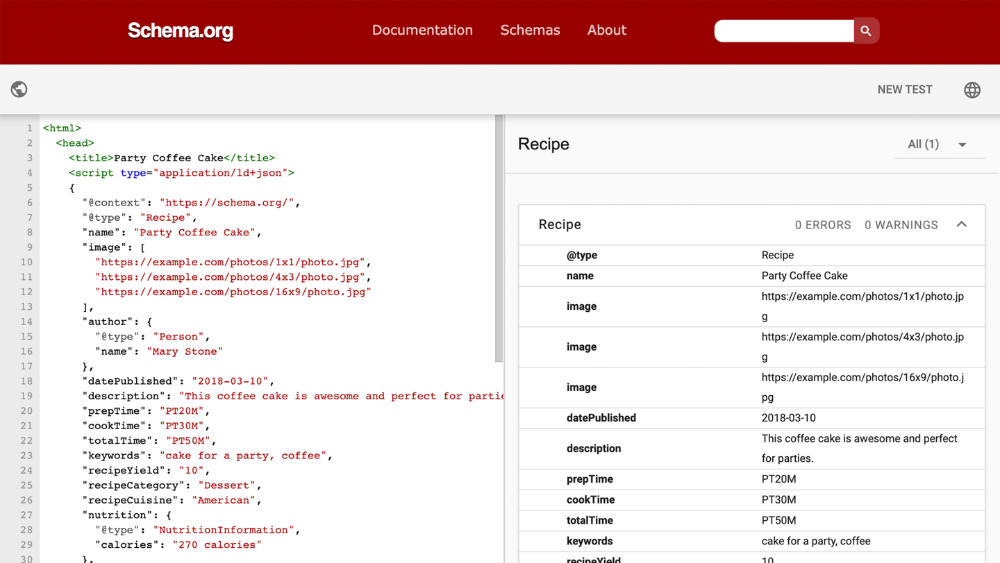
The Schema Markup Validator at validator.schema.org checks any Schema.org markup against the vocabulary itself, without Google’s specific rules. It is useful for spotting typos and wrongly nested properties, but it does not tell you whether Google will show a rich result.
Search Console
Once your markup is live, Google Search Console shows Product snippets and Merchant listings reports, listing valid items, errors and warnings across your whole site. The URL Inspection tool shows how Google sees an individual page. Check these reports after any theme change, plugin update or bulk price change.
Common product schema mistakes
- Duplicate markup: the theme and a plugin both output a Product block with different details.
- Stale prices or stock: markup hard-coded once and never updated, so it disagrees with the page.
- Missing currency: a price without priceCurrency, or a currency symbol typed into the price field.
- Invisible reviews: star ratings in the markup that do not appear anywhere on the page.
- Product markup on the wrong pages: category pages or service pages marked up as if they were a single product.
Frequently asked questions
Does product schema improve Google rankings?
Not directly. Google uses structured data to understand a page and to decide whether it can show rich results such as price, stock and star ratings. Those richer listings can attract more clicks, but rankings still depend on your content, relevance and the overall quality of your site.
Do I need product schema if I use WooCommerce or Shopify?
You already have some, because WooCommerce and most Shopify themes add basic product markup automatically. The default output often misses fields such as brand, GTIN, shipping and returns, so it is worth testing a product page and filling the gaps.
Why are my star ratings not showing in Google?
Valid markup makes a page eligible for rich results but does not guarantee them. Check the page in the Rich Results Test, make sure the reviews are genuine and visible on the page, and look for errors in the Product snippets or Merchant listings reports in Search Console.
Should I use JSON-LD or Microdata for product schema?
Google supports JSON-LD, Microdata and RDFa, and recommends JSON-LD where your site’s setup allows it. It is easier to add, read and maintain because it sits in a single block rather than being spread through your page’s HTML.
Getting product schema right
For most online shops, product schema is less about writing code and more about housekeeping: knowing what your platform outputs, completing the missing fields, and checking Search Console regularly so errors are caught before they cost you visibility. It works best as part of a wider technical foundation, alongside fast pages, clean site structure and useful product content.
Our SEO services include technical work such as structured data audits and implementation for eCommerce sites. If you would like us to check your product pages, ask for a proposal.