


ChatGPT deep research is a mode in ChatGPT that takes a research question, plans the task, searches and reads many web pages (and any files or connected apps you allow), then writes a report with citations. A typical run takes somewhere between 5 and 30 minutes, rather than the seconds a normal chat answer takes.
For a small business it is two things at once: a useful research assistant whose work you still need to check, and a new way that customers, suppliers and journalists research you. That second point is why it matters for your website.
What is ChatGPT deep research?
OpenAI launched deep research in February 2025. You can read the original OpenAI Deep Research announcement page for the background. Where a normal ChatGPT reply draws mostly on what the model already knows plus a quick search, deep research works more like a junior researcher: it breaks your question into parts, runs many searches, reads the pages it finds, follows up on gaps and pulls everything into a structured report that links to its sources.

How it has developed since launch
| Date | Change |
|---|---|
| February 2025 | Deep research launches, powered by a version of OpenAI’s o3 model, for Pro users first. |
| April 2025 | A lightweight version based on o4-mini arrives, including for free users, and allowances on paid plans increase. |
| July 2025 | OpenAI launches ChatGPT agent, which combines deep research with Operator’s ability to browse and act on websites. Deep research also remains available as its own mode. |
| February 2026 | Deep research moves to a model based on GPT-5.2. You can now edit the research plan before it starts, limit research to specific websites, connect more apps as sources, follow progress and interrupt with new instructions, and read reports full screen. |
How deep research works
- You ask a research question. The more context you give (the purpose, the region, the time period, the sources you trust), the better the result.
- It plans the task. It may ask clarifying questions, and you can review and edit the plan before it starts.
- It researches. It searches the web, reads pages and documents, and can use files you upload or apps you have connected. You can restrict it to particular websites.
- You can steer it. You can watch its progress and add instructions or sources while it works.
- It writes a report. The result is a structured report with citations linking back to the pages it used.
Is deep research free?
Free ChatGPT users can use a limited, lightweight version. Paid plans get a larger monthly allowance, and the Pro plan gets the most. OpenAI has changed these allowances several times, so check the current limits in ChatGPT itself rather than relying on figures quoted in older articles.
What small businesses can use it for
- Competitor research: what similar businesses in your area offer, how they describe their services and, where it is published, what they charge.
- Market and supplier research: comparing software, suppliers or equipment against criteria you set.
- Bids and proposals: gathering background on a sector or a prospective client before you write a tender or pitch.
- Content planning: finding the questions people ask about your services and the sources worth citing in your own articles.
- Regulation and standards: getting a first overview of the rules that apply to your sector, as a starting point for a conversation with a qualified adviser, not a replacement for one.
Limitations and how to check its work
Deep research is impressive, but it is not an authority. OpenAI itself acknowledges that it can make factual mistakes and incorrect inferences, and it can struggle to tell reliable sources from rumours. Treat every report as a draft:
- Open the citations. Check that each important claim is actually supported by the page it links to.
- Check dates. Make sure prices, rules and statistics are current, not from an old page that happened to rank.
- Look for gaps. Paywalled reports, industry databases and offline knowledge are often missing.
- Mind what you share. Before uploading client data or connecting business apps, check your plan’s data and privacy settings.
Deep research tools from other providers
OpenAI is not alone. Google added Deep Research to Gemini in December 2024, Perplexity launched its own version in February 2025, and Anthropic added Research to Claude in April 2025. They work in similar ways: plan, search, read, then report with sources. It is worth trying more than one, because they often find different sources for the same question.
What deep research means for your website
When someone asks deep research to compare suppliers in your area, it reads public web pages and decides which ones to trust and cite. It complements, rather than replaces, ordinary search, so search engine optimisation still matters. But it adds a new question: can an AI system find, understand and quote the facts on your site?
Make your key facts easy to find and quote
- State plainly what you do, where you work, who you work with and how you are different, on pages that can be crawled without logging in.
- Answer common questions directly, near the top of the page, in plain sentences.
- Keep your business name, address, phone number, opening hours and services consistent across your website, Google Business Profile and directories.
- Earn mentions and reviews on other reputable sites, because AI tools cross-check what you say about yourself.
Check you are not blocking OpenAI’s search crawler
OpenAI uses separate crawlers for separate jobs. OAI-SearchBot finds pages for ChatGPT’s search features, and OpenAI says sites that block it will not be shown in ChatGPT search answers. GPTBot collects content that may be used to train its models, and you can block it without affecting search. ChatGPT-User visits pages when a person asks ChatGPT to, and OpenAI notes that robots.txt rules may not apply to it. If you want to be visible in ChatGPT, make sure your robots.txt file, security plugin or firewall is not blocking OAI-SearchBot.
Where to go next
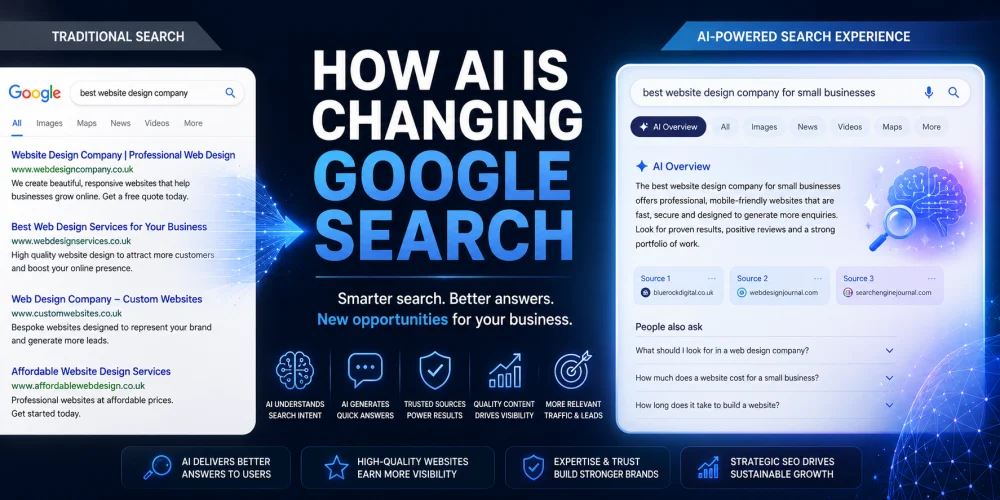
Making your content easy for AI systems to find, understand and cite is the work of Generative Engine Optimisation. The same shift is reshaping ordinary search, as explored in our guide on how AI is affecting Google searches. One practical step some businesses take is publishing an llms.txt file, a proposed format that gives large language models a structured summary of your business and services.
If you are new to the topic, start with our introduction to what GEO is and why your business needs it, then read our practical guide to optimising your website for AI search engines.
Frequently asked questions
How long does ChatGPT deep research take?
Most reports take between 5 and 30 minutes, depending on how broad the question is and how many sources it reads. You can carry on with other work while it runs.
Can I trust a deep research report?
Treat it as a well-organised first draft. OpenAI acknowledges that deep research can make factual mistakes, so open the citations, check that they support each key claim and confirm that prices, rules and figures are current.
Can ChatGPT deep research see my website?
Yes, if your pages are public and not blocked. Check that your robots.txt file and any firewall allow OpenAI’s OAI-SearchBot crawler, and make sure your key facts are written in plain text on pages that load without a login.
Should I block GPTBot on my website?
That is a business decision. Blocking GPTBot tells OpenAI not to use your content to train its models. OpenAI treats it separately from OAI-SearchBot, which controls whether your site can appear in ChatGPT search answers.
The bottom line
Deep research saves hours on background reading, as long as you check its sources before you act on what it says. And because your customers are using the same tools to research suppliers, the clearer and more consistent your own website is, the more likely it is that these tools describe your business accurately and send people your way.