
If your business isn’t showing up on Google Maps, the cause is usually one of five things: your Google Business Profile isn’t verified, it breaks one of Google’s guidelines (and has been suspended or filtered), it’s incomplete or uses the wrong primary category, your business details don’t match across the web, or competitors simply look more relevant and prominent for that search. Most of these can be fixed in an afternoon; the last one takes steady work over months.
This guide goes through each reason in the order you should check them, then gives you a step-by-step fix list. Everything starts in Google Business Profile, the free listing that controls how you appear on Maps and in the local results on Google Search.
How Google decides which businesses to show on Maps
Google says local results are based mainly on three things:
- Relevance: how well your profile matches what the person searched for. Complete, detailed information helps Google understand what you do.
- Distance: how far your business is from the searcher, or from the place named in the search.
- Prominence: how well known your business is. Google says this depends partly on how many websites link to you and on your reviews and ratings.
Google is also clear that there is no way to request or pay for a better local ranking. If you’re missing from Maps, the fix is always in your profile, your website or your wider reputation.
1. Your profile isn’t verified
An unverified profile is the most common reason a new business doesn’t appear at all. Verification is how Google confirms that your business is real and that you are entitled to manage it.
How verification works now
Google lists four main methods: phone or text, email, a live video call and a postcard by post. Some profiles are verified instantly, for example through a linked Search Console website. You don’t choose the method: Google decides which ones you’re offered based on your business type, public information, region and hours, and you may need more than one. Google recommends video verification when it’s offered.
After you complete the steps, Google says its review can take up to five business days, occasionally longer. Until it’s approved, your profile won’t show publicly.
If verification keeps failing
- Make sure your signage, vehicle livery or paperwork clearly shows the same business name as your profile.
- If you’re offered video, be ready to show where you are (the street or a landmark), your premises, signage or equipment, and something only the owner or manager could access, such as keys or a tool store.
- Check that your address follows the rules below. A virtual office or PO box will never verify.
2. Your listing breaks a guideline
A suspended or filtered profile can disappear from Maps without much warning. The most common problems in Google’s Business Profile guidelines are:
- Keywords in the business name. Use your real-world name as it appears on your signage, website and stationery. Don’t add locations, services or taglines.
- The wrong kind of address. PO boxes and remote mailboxes aren’t allowed, and virtual offices (a rented mailing address where you don’t actually work) aren’t eligible. Co-working spaces only qualify with clear signage, staff present and in-person customer service during your hours.
- Duplicate profiles for the same business at the same address.
- A service area that’s too big. Google’s guideline is that service areas shouldn’t extend beyond about two hours’ drive from your base, though it allows larger areas for some businesses.
If your profile has been suspended, fix the issue first, then submit an appeal from your Business Profile. Appealing without changing anything rarely works.
Service-area businesses
If you visit customers rather than having them visit you (plumbers, cleaners, roofers, mobile hairdressers), set your profile up as a service-area business. If you run the business from home, Google’s guidelines say to hide your address from customers and set the towns or postcodes you serve instead. Using your home address is allowed for verification; showing it publicly isn’t the right set-up for a home-based business.
3. Your primary category is wrong
Your primary category is one of the strongest relevance signals you control. Google’s guidance is to choose as few categories as possible and the most specific one that fits, so that it completes the sentence “This business is a…”. A business whose main income is building websites should choose “Website designer” rather than “Marketing agency”, for example.
- Add secondary categories only for things your business genuinely is, not for every service it offers. Services belong in the Services section.
- Don’t use categories as keywords or for businesses you don’t own.
- Look at the categories used by the businesses that do appear for your main searches. If they’re all using a more specific category than you, that may be why.
- Recheck your categories every few months, because Google adds new ones.
4. Your profile is incomplete
Google’s own advice for improving local ranking starts with complete, accurate information. A half-finished profile gives Google less to match against searches and gives customers less reason to choose you.
Business description
You have up to 750 characters. Explain what you do, who you serve, where you work and how long you’ve been trading. Google’s rules say no links, prices or promotions, and no gimmicky or keyword-stuffed text.
Services
Where your category supports it, add each service as a separate item with a short description. Use the same service names you use on your website so Google can connect the two.
Attributes
Attributes such as wheelchair access, parking or online appointments help you appear for filtered searches. Check the list in your profile from time to time, since new options appear.
Opening hours
List your real customer-facing hours and use special hours for bank holidays and closures. Don’t list hours when nobody can actually serve or answer customers: Google’s guidelines ask for accurate regular hours, and customers who find you closed tend to say so in reviews.
5. Your details don’t match across the web
Google cross-checks your name, address and phone number (often called NAP) against your website, directories and social profiles. If your business is “Smith Plumbing” in one place, “Smith Plumbing & Heating Ltd” in another and has an old phone number on a third, Google has less confidence that it has the right information.
How to audit your NAP data
- Search Google for your business name, your phone number and your old address if you’ve moved.
- List every listing you find and correct each one so the name, address and phone number match your Business Profile exactly.
- Keep a record of where you’re listed so you can update everything at once next time something changes.
The main UK places to check and claim include Yell, Yelp, Thomson Local, 192.com, Facebook, Bing Places for Business and Apple Maps (listings are now managed through Apple Business, which took over from Apple Business Connect in April 2026). For a longer list, see our guide to the top citation websites in the UK for local SEO.
6. Competitors look more relevant or prominent
Sometimes nothing is wrong with your profile: you’re simply not the strongest match for that search, from that location. A few things are worth knowing before you worry.
Distance matters a lot
If you search from your office, you’ll see a different set of results from a customer five miles away. Check your visibility from different locations (a rank-tracking tool with a location grid helps), and remember that a service-area business has no public pin, so it competes on relevance and prominence more than on proximity.
The search term may not match
If your profile and website never mention “emergency boiler repair”, you’re unlikely to appear for it, even if you do it. Add the services people actually search for to your services list, description and website.
Reviews and reputation
Google names review count and rating as part of prominence, and it recommends replying to reviews. In practice, a steady flow of recent, genuine reviews that mention the service and the town is worth more than a burst of reviews followed by nothing. Reply to every review, positive or negative, in a personal way. For a full approach, read why Google reviews matter and how to get more of them.
Never buy reviews, offer incentives for them or post reviews of your own business. Under the Digital Markets, Competition and Consumers Act 2024, commissioning or posting fake reviews has been a banned practice in the UK since April 2025, and Google removes reviews it believes are fake.
Changes take time
Edits to your profile can go through Google’s review before they show, and improvements in prominence build over weeks and months rather than days. Make your changes, then measure over at least a month.
Keep your profile active
An active profile gives customers more reasons to choose you and gives Google fresher information to work with.
Photos and videos
Google recommends adding photos and videos. Use real images of your premises, team, vehicles and finished work, not stock photos. Add new ones regularly, for example after notable jobs.
Posts
Business Profile posts (updates, offers and events) still appear on your listing, and Google now shows view counts for them in your profile. Posting doesn’t guarantee a higher position, but it keeps your profile current and gives searchers something to act on. Once or twice a week is a manageable rhythm for most small businesses; link each post to the most relevant page on your website. Our guide to 11 tips to improve your Google Maps SEO has more ideas.
The Q&A section has gone: what to do instead
Google retired the public Questions and Answers section on Business Profiles at the end of 2025. In its place, people can tap an AI-powered “Ask” option on your profile in Google Maps, and Google answers using your profile information, reviews and other details it holds about your business.
That changes what you should do:
- Make sure the facts customers ask about (prices from, areas covered, parking, payment methods, how quickly you can attend) appear in your services, attributes and description.
- Answer the same questions on your website, ideally in an FAQ section on the relevant service page.
- Read your reviews for misunderstandings and correct them politely in your replies, because reviews feed into those AI answers too.
How Google Maps AI is changing local search
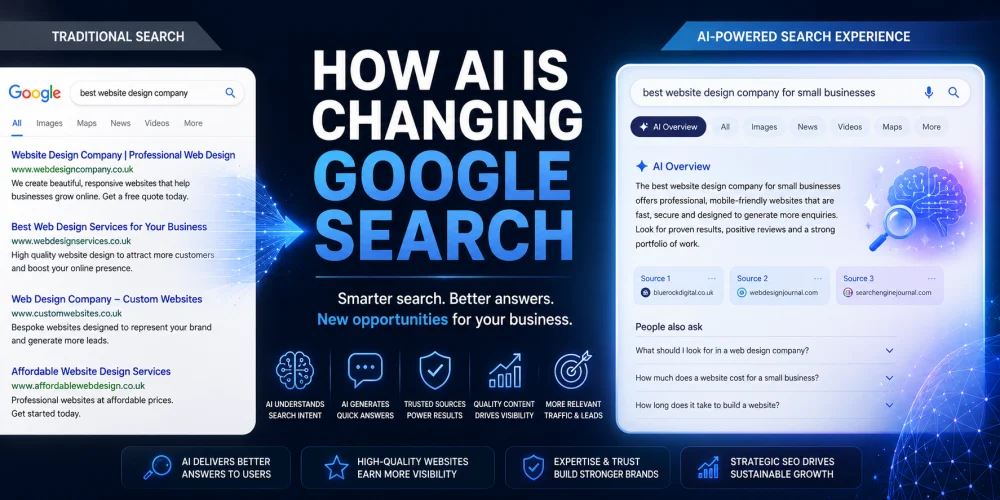
Google has built its Gemini AI into Maps through a feature called Ask Maps, which lets people ask longer, conversational questions such as “a dog-friendly café near me with parking that’s open now”. It launched in the US and India in March 2026 and Google announced its expansion to the UK and other European countries in November 2026, initially without some of the US-only features.
AI answers need detailed, consistent information to recommend a business with confidence. Complete profiles, consistent details and a website that clearly explains your services, locations and prices give you the best chance of being mentioned. For more detail, read our guide to Google Maps AI Ask Maps and what businesses need to know, and if you want your business to show up in AI answers more widely, see our AI visibility (GEO) services.
Strengthen your website’s local signals
Your profile doesn’t rank in isolation. Google compares it with your website, and a weak website holds your Maps visibility back.
Service and location pages
Create a page for each main service, and for each area you genuinely serve if you cover several towns. Link your Business Profile to the most relevant page rather than always to your homepage.
Structured data
Add LocalBusiness schema markup with your name, address (if you show it), phone number, opening hours and website, and make sure it matches your profile exactly. Service and FAQPage markup can describe your services and FAQs in a format machines read easily.
On-page details
Show your business name, phone number and address (if public) on every page, usually in the footer. Embed a map on your contact page, and describe your services in the same words you use on your profile.
Your step-by-step fix list
- Check verification. Sign in to your Business Profile and confirm it’s verified and not suspended.
- Check the guidelines. Real-world business name, an eligible address (or a hidden address for a service-area business), one profile per location, a sensible service area.
- Fix your categories. The most specific primary category, and only secondary categories that describe what your business is.
- Complete every section. Description, services, attributes, hours (including special hours), website link and photos.
- Clean up your NAP data. Make every directory and social profile match your Business Profile.
- Build reviews steadily. Send a direct review link after every job and reply to every review.
- Stay active. New photos and posts regularly, and keep your hours and services up to date.
- Back it up on your website. Service and location pages, matching structured data and an FAQ that answers real customer questions.
If you need help improving your local search visibility, we provide SEO services to businesses across Worcestershire and the West Midlands, including Worcester, Bromsgrove, Coventry and Stratford-upon-Avon, as well as web design in Worcester and web design in Bromsgrove.
Frequently asked questions
How long does it take for a new business to appear on Google Maps?
Once you’ve submitted verification, Google says its review can take up to five business days. After that your profile can appear on Maps, but ranking well for competitive searches usually takes longer, because prominence (reviews, links and mentions across the web) builds over time.
Can I use my home address on Google Business Profile?
Yes, you can verify a home-based business at your home address, but if customers don’t visit you there, Google’s guidelines say to hide the address and set a service area instead. Virtual offices and PO boxes are not eligible.
Can I pay Google to rank higher on Google Maps?
No. Google states that there is no way to request or pay for a better local ranking. You can pay for ads that appear in Maps and local results, but they are labelled as sponsored and don’t change your organic position.
Why does my business appear when I search its name but not for my services?
Searching your exact name tells Google which business you want, so your profile appears. For service searches, Google compares you with every nearby competitor on relevance, distance and prominence. Improve your primary category, services list, reviews and website content to compete for those searches.
Why isn’t my business showing up on Google Maps? A final review
There’s rarely a single cause. It’s usually a mix of an unverified or non-compliant profile, the wrong category, missing information, inconsistent details, too few recent reviews or a website that doesn’t back up your profile. The businesses that consistently appear in the map results treat their Business Profile as a living part of their marketing rather than a one-off set-up.
Our SEO services include full Google Business Profile optimisation and a local search strategy to help nearby customers find you.